Engineering validation for FFF printed parts
Accelerate physical validation from days to minutes
Built specifically for FFF 3D printing
Physics-based finite element simulation
University validated
From STL to validated print strategy
Built with engineers solving real FFF applications
16,000+
Beta users
3-6 min.
Typical simulation time
University
Validated by physical testing
Physics-based
No AI generated, real physics
Conventional CAD FEA assumes a homogeneous material
FFF printed parts are not homogeneous materials
Every printed part contains perimeters, infill and layer interfaces. These structures fundamentally change how forces travel through the part. This is why conventional CAD/CAE simulation often fails to predict real-world behavior.
Built specifically for FFF 3D printing
1) Import your STL
2) Choose print settings
3) Apply forces and fixed points
4) Predict weak locations
5) Optimize before printing
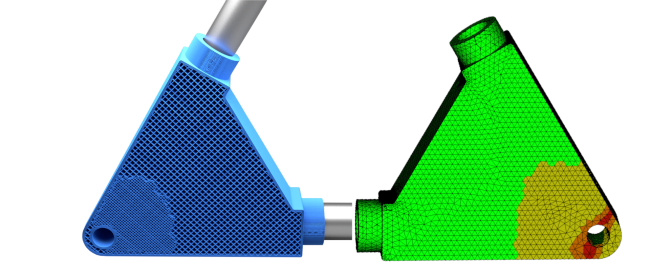
Instead of analyzing an idealized CAD model, Slicedog automatically builds a finite element model from your print settings. Perimeters, infill and top/bottom layers are simulated separately, reflecting the real mechanical behavior of FFF printed parts.
Engineering questions Slicedog helps answer
Can this 3D printed part survive the expected load?
Will changing print orientation improve strength?
Is the current infill and perimeters sufficient?
Where will the printed part fail first?
Are weak points of the CAD design the same as the weak points of the printed part?
Will carbon fiber actually solve the problem?
Automatic Strength Check
Automatic material use optimization
Automated finite element strength validation built for 3D printing
Slicedog uses a finite element–based strength model specifically designed for 3D printed parts.
Each part is automatically decomposed into perimeters, infill, and top/bottom regions, where each region has its own strength characteristics.
Strength is evaluated independently in X, Y, and Z directions for every region, reflecting the different strength behavior of perimeters, infill, and layer interfaces in real 3D printed parts.
Based on user-defined forces and fixed points, Slicedog predicts how forces propagate through the printed structure and identifies load-critical regions.
During optimization, material is redistributed to meet strength requirements with defined safety factor.
After optimization, the entire part is re-validated to ensure the target safety factor is achieved.
The strength model has been validated against real printed parts and physical load tests, not just synthetic samples — ensuring that simulation results match real-world behavior.
Validated by mechanical tests
Automated finite element strength
Pressure test of 3D-printed infill used to determine anisotropic strength characteristics (different strength in X, Y, and Z directions).
Cut days off your large print jobs
Whether you run your printers non-stop or take on large, complex jobs, long print times are often caused by overbuilt parts and uncertainty about strength.
By validating part strength before printing, Slicedog lets you confidently reduce material where it is not needed. A 6-day print can finish in just 3 days — without changing hardware, slicer profiles, or risking part failure.
The result: faster turnaround, freed machine capacity, and more predictable production.
Not only cut printing time, but cut design time too
It happens to everyone. You are about to finish your design, but you are not sure if the part is strong enough.
Instead of printing with confidence, you add material, thicken walls, or add supports — without knowing if it is actually necessary.
With Slicedog, you can validate part strength in seconds, automatically optimize material placement, and start printing right away.
No more trial-and-error prints. No more unnecessary design tweaks. Just a clear decision: this part is strong enough to print.
🚀 INCREASE YOUR PRINT CAPACITY — WITHOUT GUESSING STRENGTH
Ready to validate part strength before printing?
Slicedog helps you predict and validate the strength of 3D printed parts before printing, so you can stop overbuilding and stop guessing.